Hard Mode for porn.
The porn blocker you can’t delete at 1 a.m. Pick 30, 90 or 365 days: Clearing blocks porn in every app and browser on your iPhone, iPad and Mac, and Hard Mode holds until the time is up. No ally, no screenshots, nobody reading your history.
Clearing for Mac: a filter for every app and a Hard Mode profile that needs a password we keep until Hard Mode ends.For iPhone, iPad and Mac. One subscription covers all three.

Coming soon to the App Store · $34.99 a year or $7.99 a week · Cancel anytime
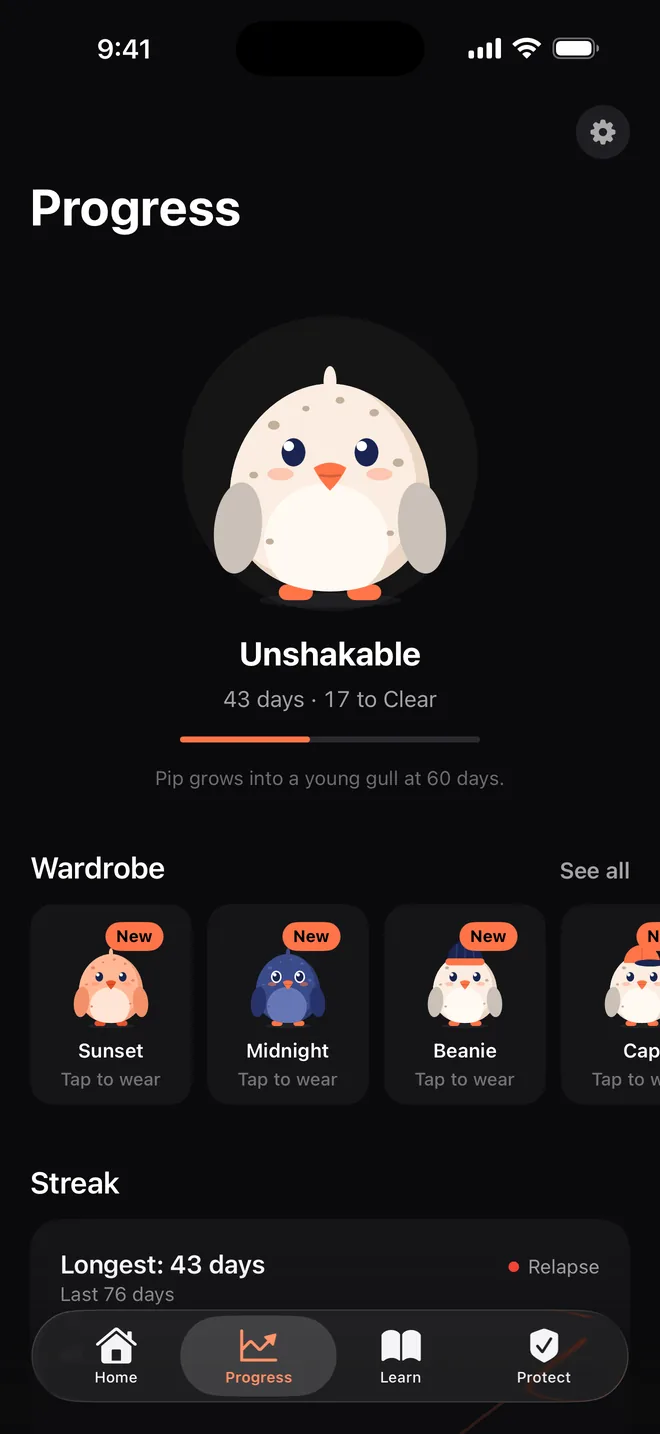
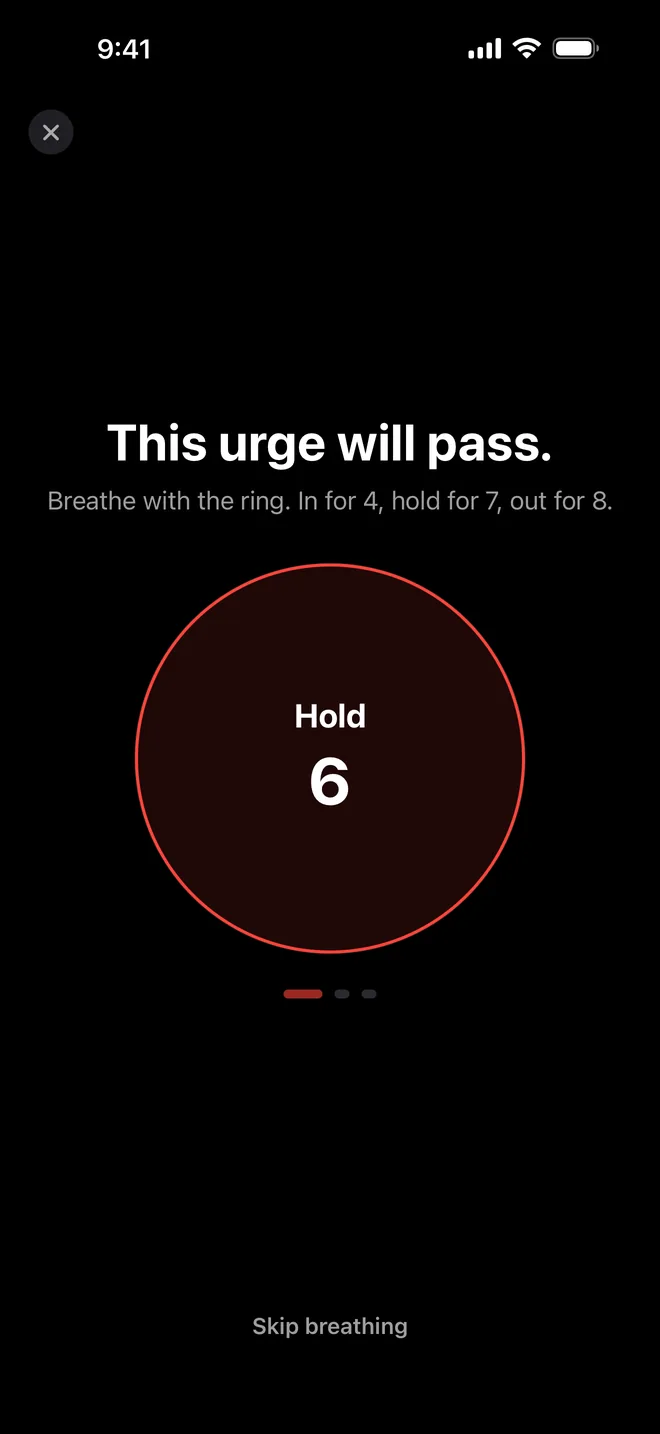
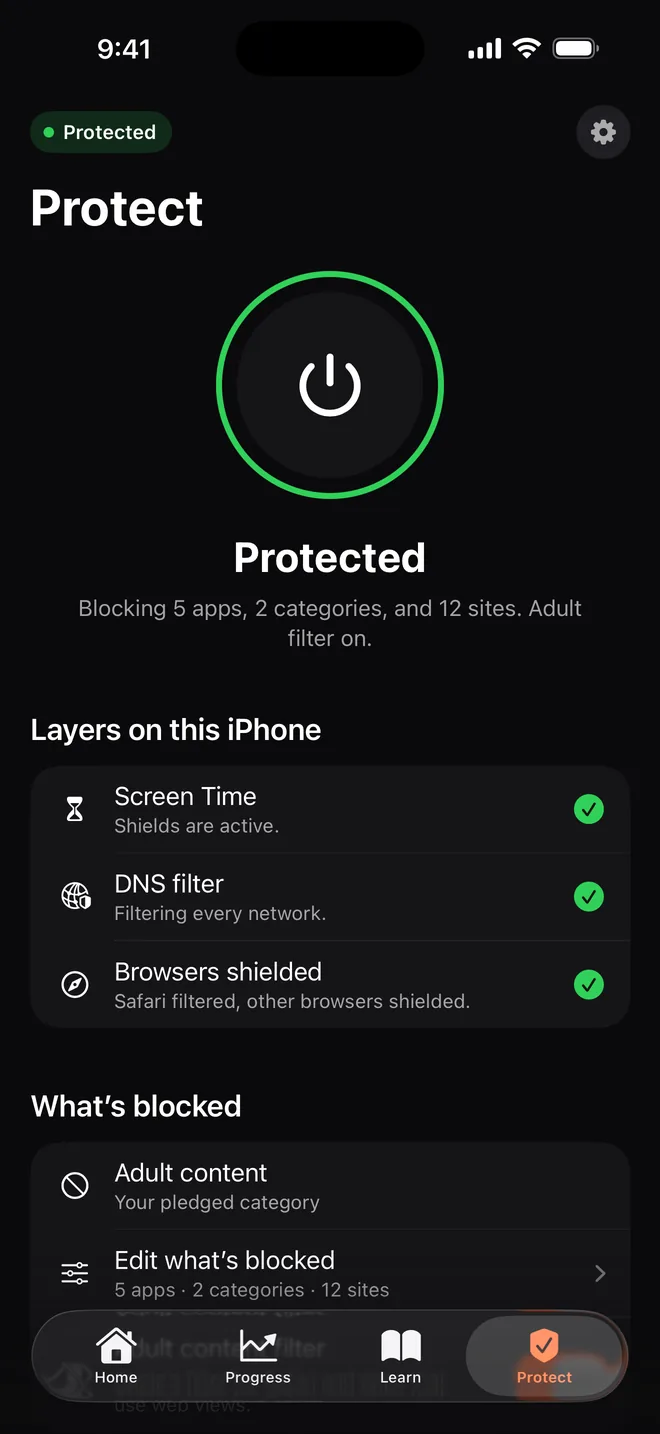
- Pick your Hard Mode: 90 days
- Hard Mode is on
- The urge passes
It’s 1 a.m. The blocker is on. You know how to delete it.
- The urge hits. The blocker is on.
- Press and hold. Delete app. Done.
- Nobody knows. Nothing happens. Back to day 0.
Hard Mode takes that button away, for as long as you choose.
How Hard Mode works
You decide once, on a calm day. Hard Mode holds you to it on the nights that aren’t.
Hard Mode until
Feb 2
Pick 30, 90 or 365 days
You choose how long Hard Mode lasts when you set Clearing up. It starts when your subscription does, and later you can only make it longer.
Can’t delete it on impulse
On iPhone and iPad, iOS blocks deleting Clearing, and its protection can only be added to, not loosened. On iOS 26.4 or later, a Screen Time code we keep also stops anyone switching off Clearing’s access. On a Mac, removing Clearing takes a password we keep until Hard Mode ends.
Leaving early takes 48 hours
Need out before the date? Ask to leave Hard Mode early. It ends after a 48-hour cool-down, long after the urge has passed.
Nobody is trapped
When the period ends, Hard Mode ends on every device, whether or not you still subscribe. If your subscription ends first, Hard Mode ends early. Blocking stays on until you switch it off.
Honest limits: below iOS 26.4, the device owner can remove Clearing’s Screen Time access in Settings with the device passcode, and Clearing then shows that protection is off. On iOS 26.4 or later you can lock that setting with a code Clearing keeps for you, but Apple may offer to recover it through your Apple Account, and erasing a device removes everything. Hard Mode stops the impulse; it isn’t a prison.
Hard Mode on every screen.
A blocker on your phone doesn’t stop your laptop. Clearing runs on your iPhone, iPad and Mac, and one subscription covers all of them.
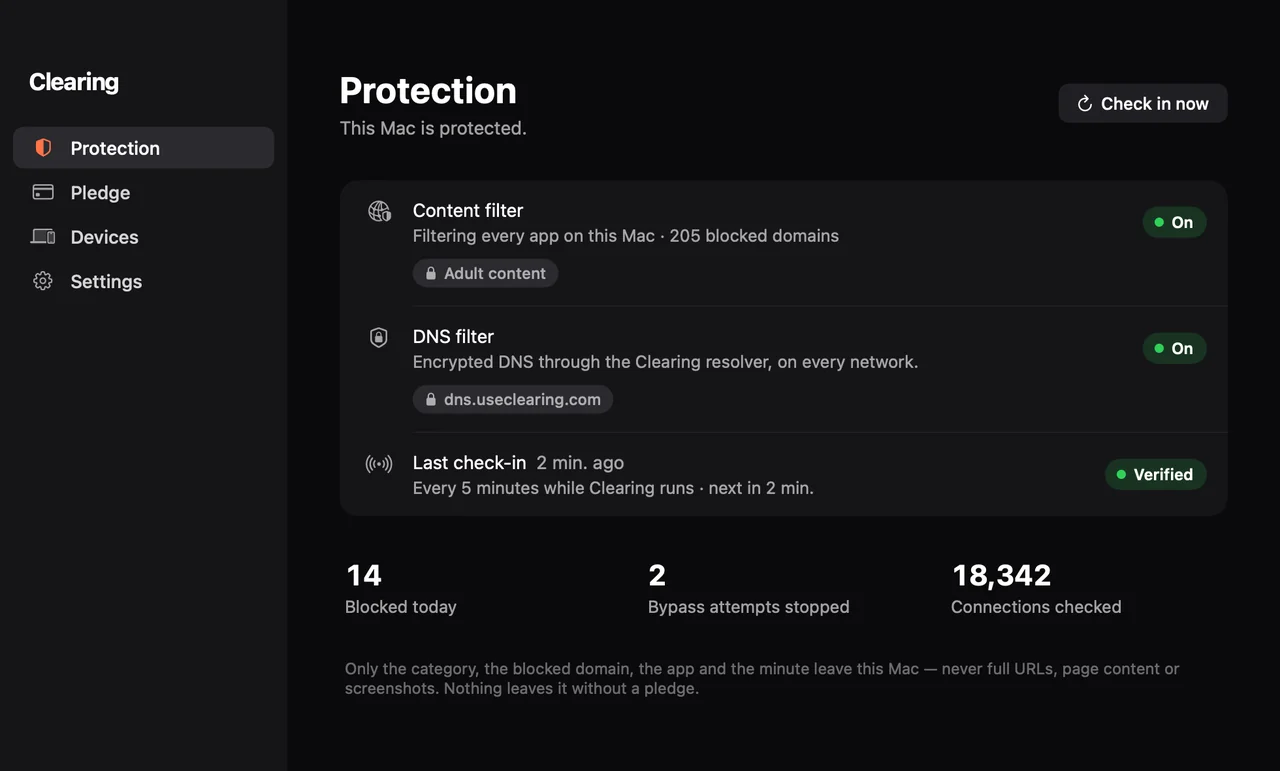
iPhone
Screen Time shields, the adult filter and the DNS filter. Can’t be deleted in Hard Mode, and on iOS 26.4 or later a Screen Time code we keep locks Clearing’s access.
iPad
The same protection and the same Hard Mode as your iPhone.
Mac
Hard Mode on your Mac too: removing Clearing takes a password we keep until Hard Mode ends.
One app, one subscription for all three. Each device shows whether it’s protected, so you know when one isn’t.
Clearing vs. the alternatives
Other blockers tell someone after you delete them. Clearing stops the delete. No ally. No screenshots. Nobody reading your history. Just a Hard Mode you set when you were calm.
| Clearing | U |  |  |  |  | |
|---|---|---|---|---|---|---|
| Blocks deleting the app on iPhone for a period you choose | Yes30, 90 or 365 days; leaving early takes 48 h¹ | No“You can turn blocking off at any time” | NoA partner is alerted after the uninstall | NoCan’t detect deletion on iPhone; needs a Screen Time passcode an ally holds | PartlyOnly after a setup on a computer | PartlyOnly during an active session |
| Guards the Mac app against removal | YesPassword we keep until Hard Mode ends | NoNo Mac app | Not verified | YesRemoval needs an Uninstall Code | YesRemoval Prevention | NoUninstall protection not on the Mac |
| No second person needed | YesNobody else involved | Yes | PartlyUninstall alerts need a partner | NoAn ally is required | PartlyAn ally reviews changes to your own settings | Yes |
| Blocks porn in every browser and app | YesDNS filter, Screen Time, Mac filter | PartlyWeb filter; apps and sites on a higher plan | YesVPN filter | YesDomain block in all apps | YesWebsites and apps | PartlyAdult websites rule |
| Price per year | $34.99 | $39.99–49.99 | $49.99–139.99 | $219.99 in the app, $198 on the website | $99.99 (1 device) | $99.99 |
¹ Below iOS 26.4, or without the Screen Time code, the device owner can remove Clearing’s Screen Time access in Settings with the device passcode; Clearing then shows that protection is off. On iOS and iPadOS 26.4 or later, you can lock that setting with a Screen Time code Clearing keeps until Hard Mode ends.
— means we couldn’t verify it on the vendor’s own pages.
As of 4 Nov 2026, US App Store, USD. Based on each company’s own website, help center and US App Store page. Prices before tax; they can change. Names and logos belong to their owners. Spotted a mistake? [email protected]
One price. Every device.
Pay weekly or once a year. Cancel anytime in your Apple ID settings.
Yearly
Best value$34.99
per year
$0.67 a week. One payment a year. Cancel anytime.
Weekly
$7.99
per week
Billed weekly. Cancel anytime in Settings.
- Hard Mode: can’t be deleted on impulse
- Blocks porn in every app and browser
- iPhone, iPad and Mac on one Apple ID
- Panic button, streak and Pip
Paid through your Apple ID when you confirm the purchase; there is no free trial. Renews automatically unless you cancel at least 24 hours before the period ends. Prices in the App Store can differ by country and include tax where it applies. When the period you chose is over, Hard Mode ends, whether or not you still subscribe. If your subscription ends first, Hard Mode ends early. Nobody is ever trapped. Terms
Built for the minute the urge hits.
Blocks porn everywhere
Every app and browser on iPhone, iPad and Mac.
A panic button
“This urge will pass.” Breathe for one minute, then call someone.
Pip grows with you
Hatches on day 1. Flies on day 90.
Private by design.
- 0people who need to know. No partner, no reports.
- 0URLs, screenshots or messages leave your device.
- 0notifications that name what you’re quitting.
- 0cookies on this site.
When something is blocked, your devices report the category, the blocked domain and the minute, so you can see your own progress. Apple handles payment; we never see your card. Terms · Privacy
No reviews yet. Here’s who’s behind it.
We built Clearing because every blocker we tried had the same weak spot: you could delete it at the exact moment you wanted to. So we built one you can’t, for as long as you choose.
Two people in Rosdorf, Germany. Write to us and one of us answers.
Jan Philip Wahle, co-founder · [email protected]
Questions
Can I really not delete Clearing in Hard Mode?
Not on impulse. In Hard Mode, iOS blocks deleting Clearing, and its protection can only be added to. On iOS 26.4 or later you can also lock Clearing’s Screen Time access with a code we keep until Hard Mode ends. But we won’t pretend it’s impossible: below iOS 26.4 the device owner can remove Clearing’s Screen Time access in Settings with the device passcode, Apple may offer to recover a Screen Time code through your Apple Account, and erasing the device removes everything. Clearing shows you when protection is off. On a Mac, removing Clearing takes the password we keep until Hard Mode ends, or erasing the Mac.
What is the Screen Time code on iPhone and iPad?
iOS and iPadOS 26.4 added Settings › Screen Time › Lock Screen Time Settings. With it on, Clearing’s Screen Time access can’t be switched off and the app can’t be deleted without a code. Clearing plays the friend who holds it: during setup it shows you a random 4-digit code once, you enter it there and skip the Apple Account recovery step if offered, and we keep it on our server. You get it back when Hard Mode ends, 48 hours after you ask to leave early, or when your subscription ends.
How is Clearing different from other blockers?
Other blockers tell someone after you delete them. Clearing stops the delete. No ally, no screenshots, nobody reading your history: just a Hard Mode you set when you were calm. And Hard Mode covers your Mac too: removing Clearing takes a password we keep until Hard Mode ends.
What if I need to leave Hard Mode early?
Ask to leave early in the app. Hard Mode ends after a 48-hour cool-down. Urges pass in minutes; 48 hours is long enough that you only leave when you really mean it. Afterwards you can turn Hard Mode on again.
What happens when my subscription ends?
Hard Mode ends early. iOS lets you delete the app again, Clearing’s settings can be changed freely, your Mac can fetch the password to remove its profile and your iPhone or iPad gets its Screen Time code. Blocking stays on until you switch it off. Nobody is ever trapped.
How does the Hard Mode profile on the Mac work?
You install a profile in System Settings. It turns on Clearing’s filter and can only be removed with a password that we create and keep on our server, or by erasing the Mac. Your Mac gets the password when Hard Mode ends, 48 hours after you ask to leave early, or when your subscription ends. For the profile, our server stores the password and the date Hard Mode ends, never sells or shares them, and deletes them with your account. You see exactly what the profile does before you install it.
What does it cost?
$34.99 a year or $7.99 a week, with no free trial. One subscription covers your iPhone, iPad and Mac on the same Apple ID. Cancel anytime in your Apple ID settings; Apple handles billing and refunds.
What does Clearing see?
Whether protection is on, and for blocked sites the category, the domain and the minute. Never full URLs, page content, screenshots or messages. Nobody else gets reports.
Which devices does it run on?
iPhone and iPad with iOS 18 or later, and Macs with macOS 15 or later. There is no Windows or Android version yet.
Who is Clearing not for?
Anyone under 18. And anyone who needs more than a blocker right now: if you’re struggling, talk to a doctor, a therapist or a helpline too.
Hard Mode for porn.
The porn blocker you can’t delete at 1 a.m. For iPhone, iPad and Mac.
Know someone who’s trying to quit? Send them a free tool.